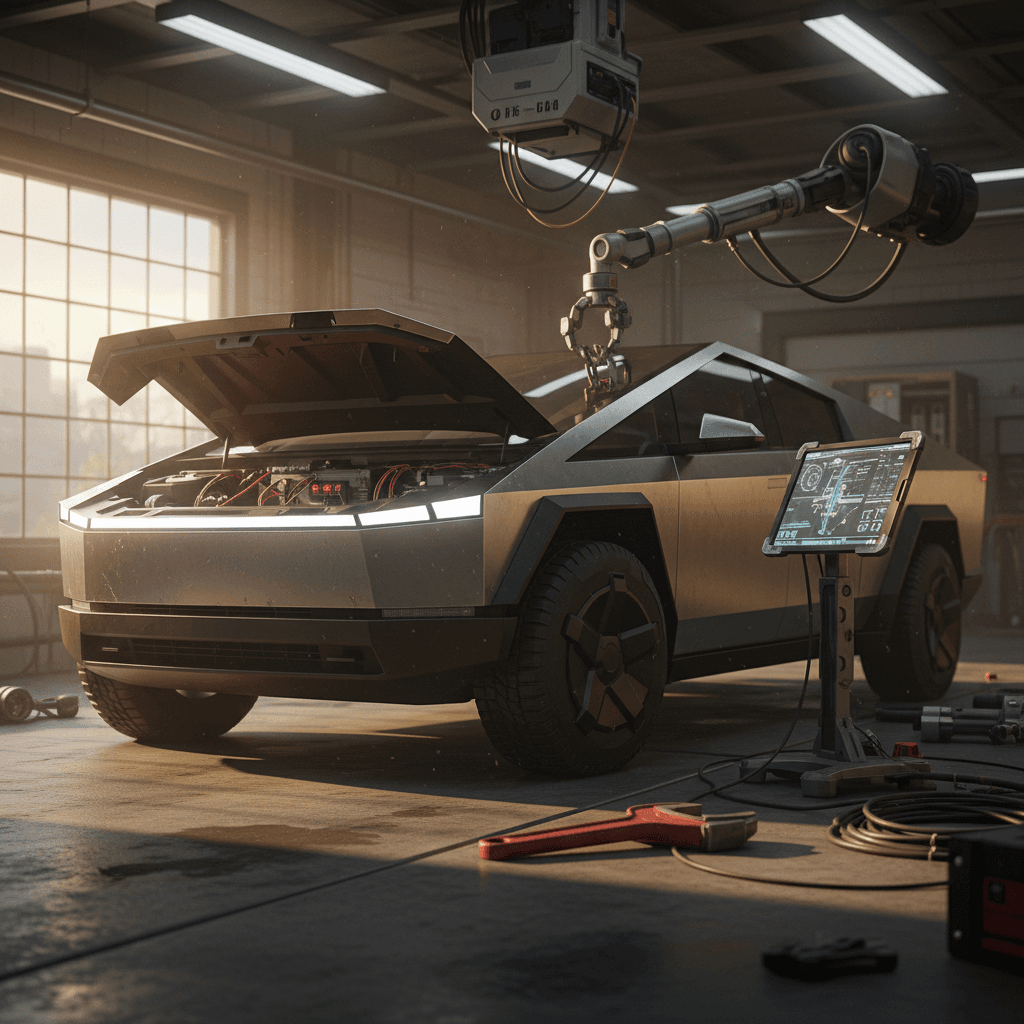
The Tesla Cybertruck is one of the most polarizing vehicles on the road, and one of the newest. That combination means the list of Tesla Cybertruck common problems and fixes is evolving in real time. Early owners have dealt with everything from stainless-steel staining and trim recalls to quirky steering, driver-assistance behavior, and multiple safety campaigns. If you own a Cybertruck today, or you’re thinking about buying a used one, understanding these issues is the key to making a smart, safe decision.
Why this guide matters now
Overview: How Cybertruck Problems Are Shaping Up in 2026
Snapshot: Tesla Cybertruck Problems So Far
Unlike a mature pickup platform that’s been iterated for decades, the Cybertruck combines a new stainless-steel exoskeleton, unique glass, and Tesla’s evolving software stack. That’s a recipe for teething issues. The good news: most are fixable. The bad news: you may be relying on Tesla’s service network and over-the-air updates more than you’d expect from a brand-new truck.
New platform = moving target
1. Body “Rust,” Corrosion and Stainless-Steel Care
One of the earliest viral Cybertruck stories was about rust spots on the stainless-steel body after just a few days in the rain. Owners posted photos of orange or brown specks, especially on lower door sections and behind the wheels. That understandably set off alarm bells for people who bought a truck advertised as nearly bulletproof.
What’s actually happening?
Most of what owners call “rust” appears to be surface contamination on the stainless, not deep corrosion of the panel itself. Iron particles from brake dust, rail transport, or shop tools can embed in the finish and oxidize, leaving orange freckles.
Tesla’s own documentation acknowledges that orange or brown spots may appear on the Cybertruck’s stainless panels over time and describes cleaning them as a routine maintenance task, not a structural defect.
Real risks and long-term unknowns
That doesn’t mean you can ignore the body. The alloy and finish Tesla chose behave differently from the 304/316 stainless used in some industrial and marine applications, and owners are still mapping out how it weathers winter road salt and coastal air.
Left completely neglected, embedded contamination and road salt can accelerate localized corrosion, especially at seams, edges and mounting points.
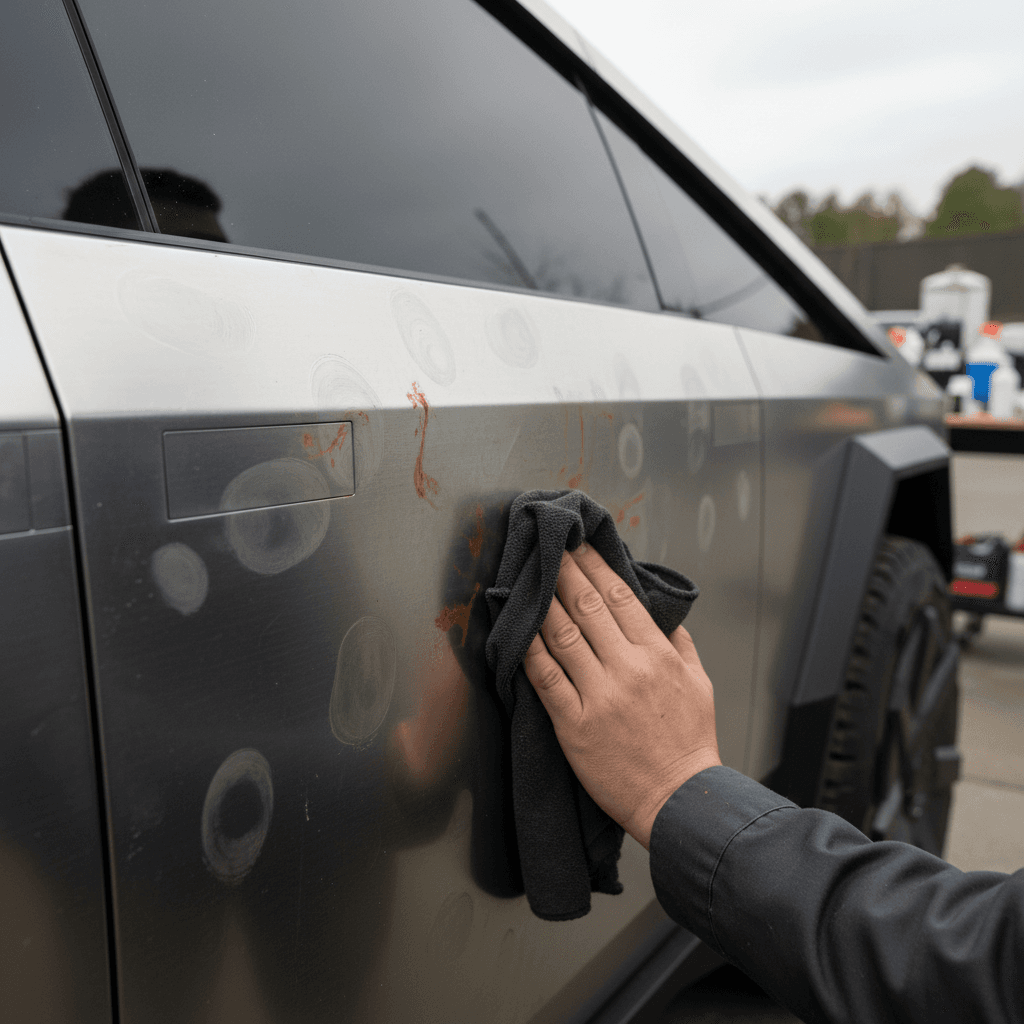
DIY Fix: Cleaning Stains and Protecting Cybertruck Stainless
1. Start with a proper wash
Use a pH-neutral car soap and microfiber mitt to remove loose dirt. Avoid automatic washes with harsh brushes that can trap metallic grit and scratch the finish.
2. Decontaminate the surface
Use an iron remover or fallout remover designed for automotive paint on a cool, clean panel. Let it dwell per the instructions, then rinse thoroughly. This helps dissolve embedded iron particles causing orange spots.
3. Spot-treat stubborn staining
For persistent spots, use a non-abrasive metal polish approved for stainless. Work with the grain of the panel using a clean microfiber. Test in an inconspicuous area first to avoid altering the sheen.
4. Add a protective coating
Consider a ceramic coating or sealant formulated for bare metal. It won’t make the truck invincible, but it will slow down contamination and make cleanup easier, especially in salty climates.
5. Inspect high-risk areas regularly
Check lower doors, rocker-like edges, wheel arches and seams every few weeks in winter. Early cleanup is far cheaper than stainless repair or panel replacement.
6. Document issues under warranty
If you see pitting or clear structural corrosion, not just surface staining, photograph it, note dates and mileage, and open a Tesla service request while you’re still under corrosion warranty.
Used-buying tip
2. Fit, Finish, Trim and Body Panel Issues
Cybertruck fit-and-finish is another recurring theme. Early reviews and owners highlighted panel gaps, misaligned doors, tailgate issues, and trim that doesn’t sit flush. That’s the downside of building a truck out of large, unforgiving stainless panels with sharp edges instead of more forgiving stamped, painted steel.
Common Body and Trim Complaints
Most of these are annoying more than dangerous, but some have safety implications if ignored.
Panel gaps & misalignment
Large or uneven gaps around doors, tailgate, or frunk. Can lead to wind noise, water intrusion, or premature seal wear.
Water leaks & wind noise
Reports of leaks at the rear glass, bed, or door seals and loud wind noise at highway speeds when doors don’t pull fully tight.
Loose exterior trim
Cybertruck-specific trims, like the cant-rail and wheel-related pieces, have been loose enough in some cases to trigger recalls.
Major trim recall to know about
Fixes and Workarounds for Fit-and-Finish Issues
1. Log every issue early
Even if a gap or misaligned panel seems cosmetic, document it with photos and open a service ticket. Tesla incrementally improves alignment procedures; they’re more likely to address issues while the truck is new.
2. Use the mobile service wisely
Simple adjustments, door striker tweaks, seal reseating, minor trim fixes, can often be handled by Tesla mobile service. That saves you a trip and keeps small problems from becoming big water leaks.
3. Test for water leaks before warranty ends
Run a hose over the truck, especially around the roof glass, rear window and doors, then check for damp carpets, headliner stains or wet bed compartments. Catching a leak early makes it much easier to argue for a warranty repair.
4. Check for recall-completed documentation
If a seller says a trim-related recall has been done, ask for the service invoice or check the VIN in Tesla’s app or the NHTSA recall search. Don’t assume every recall has been handled.
3. Accelerator Pedal and Other Safety Recalls
One of the most publicized Cybertruck safety problems has been the accelerator pedal. On certain 2024 builds, the decorative pad on the pedal could slip when pressed hard, potentially causing the pedal to stick against interior trim and keep the truck accelerating longer than intended. Tesla voluntarily recalled affected Cybertrucks to replace or rework the pedal assembly.
High-Profile Cybertruck Recalls to Date
This is not a complete list, but it covers the issues most buyers and owners should be aware of.
| Issue | Model Years Affected (Approx.) | Risk | Typical Fix |
|---|---|---|---|
| Accelerator pedal pad slipping | 2024 | Pedal may stick, increasing collision risk | Replace or rework accelerator pedal assembly |
| Cant-rail trim detaching | 2023–2025 | Detached trim could strike other vehicles | Reattach with improved adhesive and hardware |
| Wheel covers / aero caps loosening | Early builds | Covers may detach at speed | Replace covers with updated design or secure fitment |
| Optional roof light bar detachment | Accessory trucks only | Light bar could separate from roof | Reinstall or retrofit with revised mounting hardware |
Always run a VIN check with Tesla or NHTSA to confirm open recalls on a specific truck.
Don’t ignore recall notices
What to Do If Your Cybertruck Is Under Recall
1. Confirm by VIN, not rumor
Use the Tesla app or NHTSA’s VIN lookup to see if your specific truck is included. Social media often gets dates and production ranges wrong.
2. Schedule service promptly
Demand for recall appointments can spike. Book as soon as you receive a notice, even if the truck seems fine, to lock in a date.
3. Ask about mobile vs. service center
Some fixes can be handled by mobile service at your home or office. Others, like pedal replacements, may require a service center visit and possible downtime.
4. Keep all documentation
Save digital copies of every recall invoice. If you later sell the truck or pursue a lemon-law claim, this paper trail matters.
4. Lighting, Wheel and Accessory-Related Recalls
Beyond core safety systems, several Cybertruck recalls have involved add-ons and hardware at the edges of the design: wheel covers, optional light bars, and trim that doesn’t stay put at highway speeds. These problems are less about the EV drivetrain and more about the realities of designing a radically different pickup that still has to live in the real world.
- Wheel covers or aero caps that can loosen and detach at speed, especially after tire service or improper installation.
- An optional roof-mounted light bar accessory that, in some trucks, can separate from its mounts under wind load or vibration.
- Headlight and light-bar behavior that has required software calibration or hardware updates on some early builds.
Quick driveway checks
5. Driver Assistance, FSD and Lane-Keeping Behavior
Because the Cybertruck shares Tesla’s driver-assistance and "Full Self-Driving (Supervised)" stack, it also shares many of the behavioral complaints owners have about Autopilot and FSD: phantom braking, hesitation, odd lane choices, and difficulty with construction zones or tight, undivided roads.
Typical owner complaints
- Phantom braking: Sudden, unnecessary deceleration on highways for no obvious reason.
- Lane departure or "ping-ponging": Car drifts toward lane markings or rumble strips instead of tracking smoothly.
- Hesitation at turns: FSD taking odd lines through turns or failing to change lanes when prompted, especially on complex roads.
- Disengagement confusion: Situations where drivers feel the system didn’t hand control back cleanly after they tried to intervene.
Why Cybertruck amplifies the concern
The Cybertruck is physically larger and heavier than Tesla’s sedans and crossovers, with a very different footprint and sightlines. Even when the underlying software is similar, any quirk in lane choice, braking or steering can feel more dramatic.
Complaints and crash reports describing unsafe FSD behavior on Cybertruck are rare in absolute numbers but serious enough that you should treat these features as driver-assistance, not autonomy.
Always supervise FSD, especially on a truck
How to Use Cybertruck Driver Assistance Safely
1. Learn the limits in daylight first
Test Autopilot or FSD on simple, familiar roads in good weather before trusting it in complex or high-speed situations.
2. Keep a strong mental model
Ask yourself: if the system suddenly disengaged, could I safely take over right now? If the answer is ever "no," don’t use it there.
3. Customize settings conservatively
Dial back assertiveness, follow distance and lane-change aggressiveness until you see how the truck behaves in your local conditions.
4. Report repeated bad behavior
Use the in-car reporting tools when FSD makes the same mistake repeatedly. It won’t fix your drive today, but it helps Tesla prioritize updates, and adds to the public record if something goes wrong.
6. Steering Shake, Tires and Ride Quality
A smaller but important cluster of Cybertruck complaints centers on front-end vibration, steering shake at highway speeds, and tire-related issues. Some owners report aggressive shaking around 50–70 mph that service centers have attributed to tire problems or balance on specific batches of trucks.
What Owners Report, and What Usually Fixes It
As with any new truck, some problems are part defect, some are setup, some are use case.
High-speed shake
Noticeable vibration in the steering wheel or seat around certain speeds. Often reduced by rebalancing wheels, replacing faulty tires, or checking alignment.
Pulling or wandering
Truck feels like it wants to drift left or right on narrow roads. May require updated alignment specs or suspension calibration after software updates.
Tire supply & wear
Limited tire options and heavy curb weight can mean faster wear and tricky replacement logistics, especially in rural areas.
If Your Cybertruck Shakes or Wanders
1. Rule out obvious damage
Inspect wheels for curb rash or off-road damage. Even a small bend in these large wheels can create shake at speed.
2. Get a proper balance and alignment
Ask Tesla or a trusted shop with the right equipment to rebalance all four wheels and verify alignment against the latest specs, not just generic pickup settings.
3. Ask about updated tires
If a service advisor mentions a "known tire issue" or ongoing bulletin, press for specifics: is there an updated tire spec or replacement program for your build range?
4. Document unresolved vibration
If the truck still shakes after service, log it. Persistent vibration can accelerate wear on suspension and steering components and may support a buyback or warranty claim later.
7. Doors, Windows and Emergency Escape Concerns
The Cybertruck leans heavily on electronic door latches and windows. That looks futuristic and allows for a clean exoskeleton, but it also raises questions: what happens in a crash, a fire, or a total power loss? Some owner complaints describe doors unlatching unexpectedly or concerns about being trapped if the truck loses power after a severe impact.
Know your mechanical releases
Door and Window Safety: What You Should Practice
1. Find every manual release
Sit in each seat and locate the mechanical door release. Practice using it with the vehicle powered on and off so it’s muscle memory in an emergency.
2. Test doors on inclines
On a quiet street or driveway slope, check that doors latch and stay latched when you tug firmly. If any door unlatches by itself, treat it as a serious safety defect and contact Tesla immediately.
3. Talk through crash scenarios
Make sure family members know that if the screen goes black or the electronics fail, they should reach for the manual release, not wait for the touchscreen to come back.
4. Consider an emergency glass tool
Even with "armored" glass, some owners keep a high-quality window-breaking tool accessible. There’s no downside to having another escape option in a worst-case scenario.
8. Software Bugs, OTA Fixes and Owner Frustration
Like every modern Tesla, the Cybertruck is a rolling beta program. Over-the-air (OTA) updates routinely tweak steering feel, regen behavior, driver-assistance features, charging logic and more. That’s powerful, but it also means the truck you drive next month may behave differently from the one you bought.
- Updates that unexpectedly change steering weight, suspension behavior or throttle response.
- Temporary bugs that break minor features (Bluetooth quirks, UI lag, intermittent camera glitches).
- Features rolled out and then dialed back based on safety or legal concerns.
- Service telling owners to "wait for an update" rather than fixing a borderline hardware problem.
Why used buyers should ask about software history
Best Practices for Cybertruck Software Updates
1. Don’t update right before a road trip
If possible, avoid installing major updates hours before a long drive. Give yourself a few local trips to shake out any new quirks.
2. Read release notes critically
Scan for changes to steering, suspension, FSD or charging. If a new feature sounds aggressive or experimental, wait for early feedback before enabling it everywhere.
3. Keep a simple log
If you experience a new issue (vibration, steering feel, charging oddities) after an update, jot down the version and date. This can help service diagnose whether you’re dealing with software or hardware.
4. Push back when necessary
If a safety-critical behavior persists, like unpredictable braking or clear steering faults, it’s reasonable to insist on a hardware inspection rather than "just wait for another update."
9. Repair Costs, Insurance and Used Cybertruck Values
Beyond day-to-day problems, Cybertruck owners and shoppers need to grapple with what happens when something really goes wrong. The stainless-steel exoskeleton, huge glass roof, integrated tonneau cover and unique lighting make repairs more complex and expensive than a typical half-ton pickup.
Why Cybertruck Problems Can Be Expensive
Even when failure rates are low, the repair math matters.
Body and glass repairs
Unpainted stainless panels and large glass sections often require specialized labor. Minor damage that would be a simple repaint on a conventional truck can mean panel replacement here.
Insurance premiums
Insurers look at repair complexity and claim history. Early data suggests Cybertruck insurance can be noticeably higher than mass-market pickups with cheaper parts.
Resale and market perception
High-profile recalls and social-media horror stories weigh on used values, but so does scarcity. Clean, well-documented trucks can still command strong money.
How Recharged helps used buyers
Ready to find your next EV?
Browse VehiclesFor a Cybertruck specifically, you’ll want to pay close attention to any accident history, panel repair invoices, and whether prior owners used Tesla-certified shops. A truck that’s had exoskeleton or roof-glass work done poorly can be much harder to sell or insure down the road.
Checklist: Before You Buy a Used Cybertruck
Key Steps for Evaluating a Used Cybertruck
1. Run a full VIN history and recall check
Look for structural damage, airbag deployments and repeated service visits for the same complaint. Confirm all recalls are closed, especially pedal, trim and accessory campaigns.
2. Inspect the stainless in good light
Walk the truck slowly and look for ripples, panel waves, weld marks, orange staining and obvious polishing patches. Subtle body repairs can be easier to hide on unpainted metal.
3. Test doors, windows and manual releases
Open and close every door and window multiple times. Then try each manual emergency release with power on and off. Anything that sticks, double-latches, or feels inconsistent is a red flag.
4. Drive at mixed speeds with and without driver aids
Do at least 10–15 minutes at 55–70 mph. Note any shake, wandering, or unusual FSD behavior. Then drive the same stretch with all driver-assistance disabled to isolate hardware issues.
5. Check tires, wheels and underbody
Look for uneven tire wear, mismatched tires, bent wheels, and underbody scrapes from off-roading or curb impacts. These can foreshadow alignment and suspension headaches.
6. Get an independent EV inspection if possible
A specialist familiar with Tesla repair economics can walk you through worst-case costs. If you buy through Recharged, that inspection and pricing work are already baked into the Recharged Score.
FAQ: Tesla Cybertruck Common Problems and Fixes
Frequently Asked Questions
Bottom Line: Should Cybertruck Problems Stop You?
The Cybertruck is not a normal truck, and its problem set isn’t normal either. Some of the biggest stories, surface "rust," viral panel gaps, or trim pieces that didn’t like high-speed airflow, are more about Tesla learning the realities of building a stainless pickup at scale than about the underlying EV platform. Others, like accelerator pedal recalls, driver-assistance behavior and expensive body repairs, deserve sustained attention from any prospective owner.
If you’re attracted to the Cybertruck’s capabilities and design, the real question isn’t "Is it perfect?", it isn’t. The question is whether you’re comfortable living with a rapidly evolving product and the service model that comes with it. Doing your homework on Tesla Cybertruck common problems and fixes, choosing a truck with solid documentation, and leaning on expert help when you buy can turn a risky experiment into a more predictable ownership experience.
And if you’d rather not be the one guessing how a particular truck’s recall history, body condition, and software updates all fit together, working through a specialist used-EV retailer like Recharged gives you a Recharged Score, transparent pricing, and EV-focused support from first question to final delivery.