If your Genesis GV60 suddenly won’t wake up, refuses to shift out of Park, or shows a cluster of electrical error messages, there’s a good chance the culprit is the 12V auxiliary battery, not the big high‑voltage pack. Understanding Genesis GV60 12V battery replacement, symptoms, location, and costs, can save you time, stress, and potentially a tow bill.
Why the 12V matters on a modern EV
Genesis GV60 12V battery basics
The GV60 actually has two different batteries: the large high‑voltage (HV) traction battery that moves the car, and a smaller 12V auxiliary battery that runs the low‑voltage electronics. The HV pack periodically tops up the 12V battery through the car’s power electronics, but that doesn’t make the 12V immune to age, software issues, or parasitic drains.
Two batteries, two very different jobs
Knowing which one is acting up helps you avoid the wrong repair
12V auxiliary battery
- Powers control modules, locks, alarms, screens, relays, and the HV contactors.
- Failure can make the GV60 appear completely dead or stuck in Park.
- Relatively inexpensive and similar concept to an ICE car’s starter battery.
High‑voltage traction battery
- Stores energy for propulsion and fast charging.
- Managed by complex safety and thermal systems.
- Far more expensive; issues usually trigger clear EV‑system warnings, not just a no‑start.
12V problems have been common on early GV60s
Common GV60 12V battery symptoms
A weak or failing 12V battery on a Genesis GV60 doesn’t always behave like an old‑school gas car with a slow crank. Instead, you’ll often see a mix of warning lights, failed wake‑ups, and strange app behavior. Here are the patterns owners report most often.
- Vehicle won’t ‘Start’ or shift out of Park, even though the main battery shows charge.
- Dead car in the morning after sitting overnight or for a couple of days, sometimes right after a software update or recall work.
- Cluster and center screen stay black or boot very slowly; instrument cluster may appear to flicker or reset.
- Genesis app can’t connect to the car, even when you have signal.
- Multiple error messages that clear temporarily after a jump or 12V reset.
- Alarms, locks, or power tailgate act erratically, then the vehicle goes completely unresponsive.
Quick test before you panic
Is it the 12V or the high-voltage pack?
Symptoms that usually point to the 12V battery
- Car is completely dead after sitting for a short time, even with plenty of main battery range left previously.
- Jumping the 12V battery brings the car back to life immediately.
- Random electronic glitches (screens, locks, app) clustered around cold weather or after recall updates.
Symptoms that usually point to the HV pack or charging system
- Vehicle powers on but shows clear ‘EV system’ or high‑voltage errors and won’t drive or charge.
- Fast charging suddenly limited, or the car won’t accept DC fast charge anywhere.
- Range has dropped significantly over time with no 12V issues.
If you’re not sure, don’t guess. Have the vehicle scanned by a Genesis dealer or an EV‑savvy independent shop.
Safety first around high voltage
Genesis GV60 12V battery location and specs
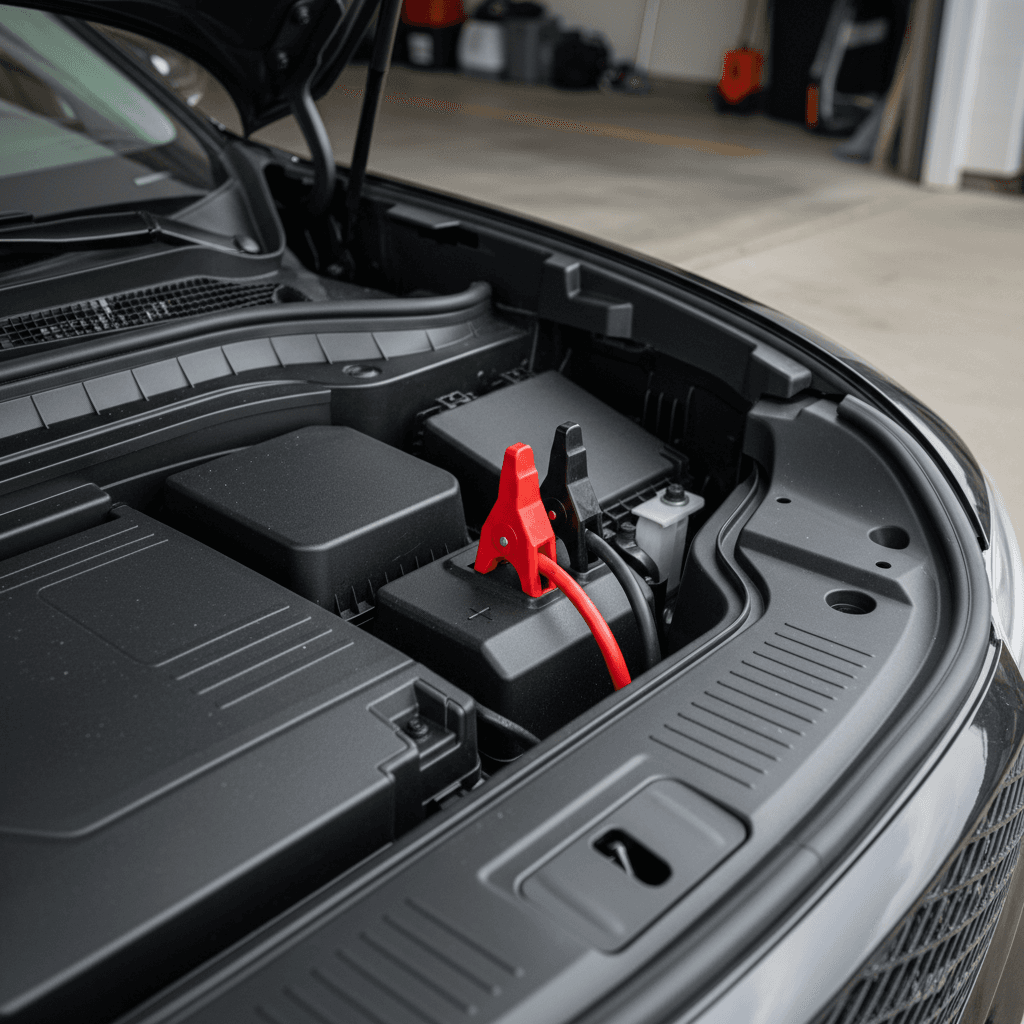
On the GV60, the 12V auxiliary battery sits in the front trunk (frunk) area under a plastic cover, accessible once you open the hood and frunk. Genesis emergency‑response documentation shows the negative terminal is designed to be disconnected there for safety procedures, which is the same access point you’ll use for replacement or a hard reset.
Typical Genesis GV60 12V battery specifications
Always verify against your under‑hood label or owner’s manual before ordering a replacement.
| Parameter | Typical spec | Notes |
|---|---|---|
| Battery type | 12V AGM (Absorbent Glass Mat) | Designed to handle deep cycles and accessory loads. |
| Nominal voltage | 12 V | Charging system maintains it via DC‑DC converter from HV pack. |
| Capacity (Ah) | Around 60–70 Ah | Check label for exact rating. |
| Cold Cranking Amps (CCA) | ≈ 600+ CCA | Enough to power control modules and safety systems, not an ICE starter. |
| Physical location | Front trunk (frunk), under plastic cover | Access via hood and frunk release. |
| Polarity | Standard top‑post (+ / −) | Confirm before ordering aftermarket replacements. |
Exact specifications can vary by model year and market, but most GV60s use an AGM‑style 12V battery sized similarly to other Hyundai/Genesis EVs.
AGM vs. lithium aftermarket options
Step-by-step GV60 12V battery replacement (overview)
If you’re comfortable working around basic automotive electrics, you can technically replace the GV60’s 12V battery yourself. The physical swap is similar to an ICE car, but the stakes are higher because so much of the vehicle depends on clean voltage. When in doubt, have a dealer or EV‑specialist shop perform the work.
1. Prep and tools you’ll need
Confirm it’s really a 12V issue
If a jump pack on the 12V posts immediately wakes the car and it goes into Ready mode, the 12V battery is likely the problem. If not, stop and call for service.
Gather tools and safety gear
You’ll typically need a 10mm socket or wrench, trim tool or flat screwdriver to remove covers, and gloves/eye protection. If the battery is heavy, get help lifting it out.
Choose a compatible replacement
Match voltage, capacity, and physical size, and stick to a 12V AGM or a reputable lithium drop‑in sized specifically for the GV60. Double‑check polarity and terminal type.
Park safely and power down
Park on level ground, set the parking brake, and power the vehicle off. Remove the smart key and keep it several feet away before you disconnect the battery so the car can’t accidentally wake up.
2. High-level removal and installation steps
Access the frunk and battery cover
Open the hood and the front trunk. Remove the plastic clips and battery cover to expose the 12V battery and terminals.
Disconnect the negative (–) terminal first
Using a 10mm socket, loosen the clamp on the <strong>negative</strong> terminal and move the cable aside so it can’t spring back into contact.
Disconnect the positive (+) terminal and hold-down
Loosen the positive clamp and any hold‑down bracket or strap securing the battery. Avoid touching metal parts with a tool that’s also contacting the positive terminal.
Lift out the old battery carefully
Batteries are heavy. Lift straight up, keeping it level to avoid spills if it’s not completely sealed. Set it aside on the ground, not on painted body panels.
Drop in the new battery
Place the new 12V battery into the tray in the same orientation as the old one. Make sure it sits fully flat and the hold‑down hardware lines up correctly.
Reconnect positive (+), then negative (–)
Install and tighten the <strong>positive</strong> terminal first, then the <strong>negative</strong>. This sequence helps reduce the risk of accidental short circuits during installation.
Reinstall covers and check operation
Put the battery cover and plastic trim back, close the frunk, and attempt to power the vehicle on. Expect some warning messages and window or steering resets, which we’ll cover next.
When you should not DIY this job
After replacement: resets and soft reboots
Once you replace or reconnect the GV60’s 12V battery, the car may behave oddly on the first start. That’s normal: modules are waking up, relearning limits, and synchronizing with the high‑voltage system. A few quick resets and checks can smooth things out.
- Power the car to Ready mode and let it sit for a minute so modules can finish booting.
- Cycle the vehicle off and back on once or twice if the cluster or infotainment seems sluggish.
- Reset one‑touch window up/down if needed by fully lowering and then fully raising each window and holding the switch briefly at the top.
- Re‑set steering‑assist preferences, driver‑assist settings, and radio presets that may have been cleared.
- If the Genesis app isn’t talking to the car, sign out and back in, or delete and reinstall the app and re‑link the vehicle. A fresh 12V reboot often resolves stuck connections.
- If weird behavior continues, blank cluster, persistent warning messages, or charging errors, schedule service. There may be a deeper software or ICCU‑related issue behind your 12V trouble.
Soft resets before you grab a wrench
Costs, warranty coverage, and when to use a dealer
How much you’ll pay for a Genesis GV60 12V battery replacement depends heavily on whether the vehicle is still under warranty, and whether the root cause is a defective battery or another module drawing it down.
Typical Genesis GV60 12V battery costs (U.S. ballpark)
When the dealer should handle it
- The vehicle is still under basic or EV‑system warranty.
- You’ve had more than one dead‑12V incident in a short period.
- There are open recalls or technical service bulletins related to charging or electrical systems.
- You suspect a parasitic drain (for example, a stuck charge‑door module or telematics unit).
In these cases, you want the failure recorded in Genesis’ system for future goodwill and resale value.
When DIY or an independent shop makes sense
- The car is out of warranty and the 12V battery is clearly aged (4–6+ years old).
- You’re comfortable working on 12V systems and have the right tools.
- You want to upgrade to a premium AGM or lithium 12V battery.
- A trusted EV shop offers better pricing than your local dealer.
How Recharged helps if you’re shopping used
Ready to find your next EV?
Browse VehiclesPreventing future 12V battery failures
You can’t control every software bug or bad cell, but you can stack the deck in your favor. The GV60’s DC‑DC converter is designed to maintain the 12V battery from the main pack, yet real‑world use shows it still pays to be intentional about how you park, charge, and maintain the car.
Practical ways to extend your GV60’s 12V battery life
Daily habits make more difference than you’d think
Drive or ‘wake’ it regularly
Short, infrequent trips or letting the GV60 sit for long periods without waking can allow the 12V to run low. Periodically driving or at least powering the vehicle to Ready gives the DC‑DC converter time to top up the battery.
Be smart about long-term parking
If you’ll park for more than a week, store the car with a reasonable HV charge level and consider leaving it plugged into a reliable Level 2 charger. Check your owner’s manual for recommended long‑term storage practices.
Watch for early warning signs
Slow booting screens, intermittent app connections, and random electrical gremlins can be early flags. Get the 12V tested at a dealer or EV shop instead of waiting for a full no‑start event.
Stay current on software updates
Some GV60 service campaigns and recalls address charging logic and control modules that can affect 12V behavior. Ask your dealer to confirm you’re up to date whenever the car is in for service.
Check voltage periodically
If you’re technical, you can measure 12V battery resting voltage with a multimeter or Bluetooth monitor. Catching chronic low‑voltage early can save you from unexpected failures.
Don’t ignore repeated failures
More than one dead‑12V incident on a newer GV60 is a sign that something else is wrong, software, charging hardware, or a parasitic draw. Keep receipts and service records; they matter later if you sell or seek goodwill coverage.
Used Genesis GV60 buying considerations
If you’re shopping for a used Genesis GV60, especially an early 2023 or 2024 build, 12V history is something you’ll want to put under the microscope alongside high‑voltage battery health and charging behavior.
12V and electrical questions to ask a seller
Any history of dead‑car incidents?
Ask directly whether the GV60 has ever failed to wake up, needed a jump, or been towed due to a dead battery. Follow up with: how many times, and what did the dealer say?
Has the 12V battery been replaced?
A documented 12V replacement isn’t automatically bad news, it may simply reflect an early defective battery. You’re looking for proof it was handled professionally, with supporting paperwork.
Were any recalls or software campaigns performed?
Request service records that show relevant campaigns were completed, particularly those related to charging logic, ICCU components, or electrical systems.
Any unexplained electrical gremlins?
Probe for recurring issues like random warnings, app disconnection, or screens that go dark. Occasional glitches happen; a pattern is what should concern you.
Who diagnosed previous issues?
A Genesis dealer or EV‑specialist shop on record is much better than ad‑hoc jump‑starts with no root‑cause inspection documented.
Leverage inspection data when buying used
Genesis GV60 12V battery replacement FAQ
Frequently asked questions about GV60 12V batteries
Key takeaways for GV60 owners and shoppers
For an EV as sophisticated as the Genesis GV60, a humble 12V auxiliary battery can still be your weak link. When that small battery struggles, the car can look completely dead, even with plenty of range in the main pack. Learning the warning signs, knowing where the 12V battery lives, and understanding basic replacement costs put you in control instead of at the mercy of an unexpected no‑start.
If you own a GV60 now, stay on top of software updates, listen to what the electronics are telling you, and push your dealer for a root‑cause diagnosis if 12V issues repeat. If you’re shopping used, treat 12V history and electrical health as part of the bigger battery story. And if you’d rather skip the guesswork, browsing GV60s on Recharged means every candidate comes with a Recharged Score report, expert EV guidance, and transparent history, so you can focus on enjoying the drive, not worrying whether it will start tomorrow.