Buy an EV

  • EVs for sale
  • Learn about EVs
  • Articles
  • Charging

Sell or trade

  • How it works

Financing

  • Get pre-qualified
  • Credit application

Contact us

  • Book a consultation
  • Call us at (804) 390-5910
  • Email us at hello@recharged.com
  • Visit our Experience Centers
    • Richmond, VA
    • Fairfax, VA
    • Charlotte, NC

© 2025 Recharged. All Rights Reserved.

7-Day Return Policy·Privacy Policy·SMS Opt-In·Do Not Sell or Share My Information·
TikTokYouTubeInstagramLinkedInFacebook
    Best Electric Cars With Physical Buttons in 2026
    Reviews & Comparisons·9 min read·By Recharged Editorial Team

    Best Electric Cars With Physical Buttons in 2026

    best-evsev-interiorsphysical-buttonstouchscreen-fatigueev-buying-guideused-evsev-ergonomicsdriver-safetyclimate-controlsinfotainment

    Table of Contents

    • Why physical buttons matter in electric cars
    • How much screen is too much?
    • Best electric cars with physical buttons today
    • Used EVs with the most physical controls
    • How to evaluate buttons vs touchscreens on a test drive
    • Shopping used? How Recharged helps
    • FAQ: Physical buttons in EVs
    • Bottom line: Pick the EV that fits your hands, not just your range

    If you’re tired of poking at giant touchscreens just to turn on the heated seats, you’re not alone. Many drivers searching for the best electric cars with physical buttons want real knobs and switches for climate, audio, and safety features instead of endless on‑screen menus. The good news: you don’t have to give up intuitive controls to go electric.

    The button comeback

    After a decade of “giant tablet” dashboards, several automakers are quietly bringing back knobs and hard keys for critical functions like climate and volume, especially in their latest EVs and performance variants.

    Why physical buttons matter in electric cars

    Touchscreens look futuristic, but in daily driving they can be tiring, and sometimes distracting. A physical knob or rocker switch lets you adjust temperature, fan speed, or volume by feel, while keeping your eyes on the road. In an EV, where instant torque and silent speed can mask how fast you’re actually going, that simplicity matters even more.

    • Eyes-on-the-road safety: You can find a raised hazard button, volume knob, or defrost switch without hunting through a submenu.
    • Muscle memory: After a week with a well‑designed button layout, your hand just goes to the right place.
    • Better in bad conditions: Gloves, cold fingers, and bumpy roads all make tiny on‑screen touch targets harder to hit.
    • Shared drivers: If multiple people drive the car, physical buttons are easier for everyone to learn quickly.

    Screens aren’t the enemy, just don’t hide the basics

    Big screens are great for maps and cameras. Problems start when basic, frequently used functions, like defrost, seat heat, or drive modes, are buried two or three taps deep.

    How much screen is too much?

    Good balance: screen + buttons

    A well‑designed EV interior typically uses the touchscreen for navigation, apps, and settings you change occasionally, while keeping physical controls for:

    • Temperature up/down
    • Fan speed and direction
    • Front/rear defrost
    • Seat and wheel heaters
    • Radio volume and track skip

    Too much screen, not enough feel

    At the other extreme, some EVs, especially earlier Teslas and a few first‑wave crossovers, push almost everything into a central display. That can mean:

    • No dedicated climate buttons at all
    • Seat heat icons that move with software updates
    • Simple tasks requiring multiple taps and swipes
    • More time looking down instead of ahead

    Quick rule of thumb

    If you can’t change temperature, fan speed, and audio volume in under a second by feel alone, that car is too screen‑dependent for button lovers.

    Best electric cars with physical buttons today

    Below are electric models, some brand‑new, some established, that stand out for keeping real buttons and knobs where they matter. Availability will vary by trim and model year, especially if you’re shopping the used market.

    Top EV picks for physical controls

    Driver-friendly interiors that don’t bury everything in a screen

    Hyundai Ioniq 5

    The Ioniq 5 blends twin 12.3‑inch screens with a practical bank of haptic climate keys and steering‑wheel buttons. You get:

    • Dedicated climate strip with temperature, fan, and defrost controls
    • Hard keys for drive modes and safety assists on the wheel
    • Physical seat‑heat/cool buttons on higher trims

    It’s a great sweet spot if you want modern tech without feeling like you’re driving a tablet on wheels.

    Hyundai Ioniq 6 (and Ioniq 6 N)

    Hyundai’s swoopy sedan goes even further. Reviews of the performance‑oriented Ioniq 6 N call out how it’s “covered in buttons,” using physical switches for most key functions instead of burying them in menus.

    • Console toggles for climate and seat functions
    • Additional drive‑mode controls on the steering wheel
    • Conventional stalks for wipers and lights

    Nissan Leaf (2nd generation)

    The aging but affordable Leaf is practically old‑school in a good way. It keeps:

    • Big, chunky climate knobs and hard keys
    • A dedicated heated‑steering‑wheel button on the dash
    • Physical radio buttons and volume knob

    If you can live with modest range, a used Leaf is a haven for button fans.

    More EVs that keep real switchgear

    Worth a look if you’re allergic to all‑touch dashboards

    Kia EV6

    The EV6 shares its platform with the Ioniq 5 but has its own approach. A capacitive strip doubles as a climate/audio panel, and there are still:

    • Dedicated buttons for defrost, seat heaters, and key drive functions
    • Traditional stalks and steering‑wheel controls for common tasks

    It’s more touch‑sensitive than the Ioniq 5, but still friendlier than many EVs.

    Premium outliers: button‑heavy performance EVs

    High‑end EVs like Ferrari’s upcoming Luce prove that luxury doesn’t have to mean fewer buttons. Early previews show:

    • Roof‑mounted toggle switches for lights and heated screens
    • Mechanical‑feeling controls for drive modes
    • A focus on tactile “cockpit” switchgear

    They’re more poster car than practical daily driver, but show where interior design could be headed.

    What about Tesla?

    Teslas famously minimize physical controls, no dedicated climate or seat buttons, and a heavy reliance on the center screen. If you crave knobs and switches, you’ll probably be happier in a Hyundai, Kia, Nissan, or other brands that keep more hard keys.

    Used EVs with the most physical controls

    If you’re shopping used, where the value is often best, you’ll see a wide range of interior philosophies. Some early EVs chased the giant‑screen trend, while others quietly kept more traditional layouts.

    Used EVs that still feel like cars, not tablets

    General tendencies by model; exact controls can vary by year and trim. Always verify in person or with detailed photos before you buy.

    ModelTypical Model YearsClimate ControlsAudio ControlsDriver Aids / Shortcuts
    Nissan Leaf2018–2024Physical knobs + buttonsVolume knob + hard keysSteering‑wheel buttons
    Hyundai Ioniq 52022–2025Dedicated climate strip (haptic keys)Volume knob + wheel buttonsMode, lane‑keep, and more on wheel
    Kia EV62022–2025Capacitive climate/audio bar + buttonsPhysical volume + skip keysDrive‑mode and assist buttons
    Chevy Bolt EV/EUV2019–2023Physical buttons for temp and fanKnobs for volume/tuningBasic wheel buttons
    VW ID.4 (earlier years)2021–2023Mix of sliders and touch, less idealTouch sliders, minimal knobsWheel buttons; newer models improving

    Button presence is about feel, not just quantity, look for large, well‑grouped controls you can hit without thinking.

    Same model, different year, different buttons

    Automakers constantly tweak interiors. A 2022 Ioniq 5 and a 2025 Ioniq 5 may not have identical button layouts. When you’re shopping used, rely on up‑to‑date photos and, if possible, a hands‑on test.

    How to evaluate buttons vs touchscreens on a test drive

    You don’t need an engineering degree, or even a lot of time, to figure out whether an EV’s cabin will drive you crazy. Use your test drive to run a few quick “ergonomics drills.”

    Driver-friendly controls checklist

    1. Adjust climate without looking down

    With the car in motion, try bumping the temperature up, turning the fan down, and hitting the defrost. Can you do it by feel in under a second, or are you stabbing at a small on‑screen icon?

    2. Change audio sources and volume

    Switch from Bluetooth to radio and adjust volume. Look for a real volume knob and clear, labeled buttons or rockers for track/station changes.

    3. Activate driver assists

    Try turning lane‑keeping or adaptive cruise on and off. The safest setups use steering‑wheel or stalk buttons, not submenus in the touchscreen.

    4. Find the heated seats and wheel

    These are things you’ll use all winter. Dedicated buttons or toggles near the shifter or on the console are ideal. Tiny moving icons on a screen are not.

    5. Try it in park, then while moving

    Something that seems easy while you’re sitting still can feel much fussier at 65 mph. Repeat the same tasks on a smooth stretch of road and see how the car feels then.

    6. Ask yourself: am I fighting the car?

    If you’re frustrated or constantly glancing down during a short drive, imagine doing that every day for years. There are plenty of EVs that won’t fight you.
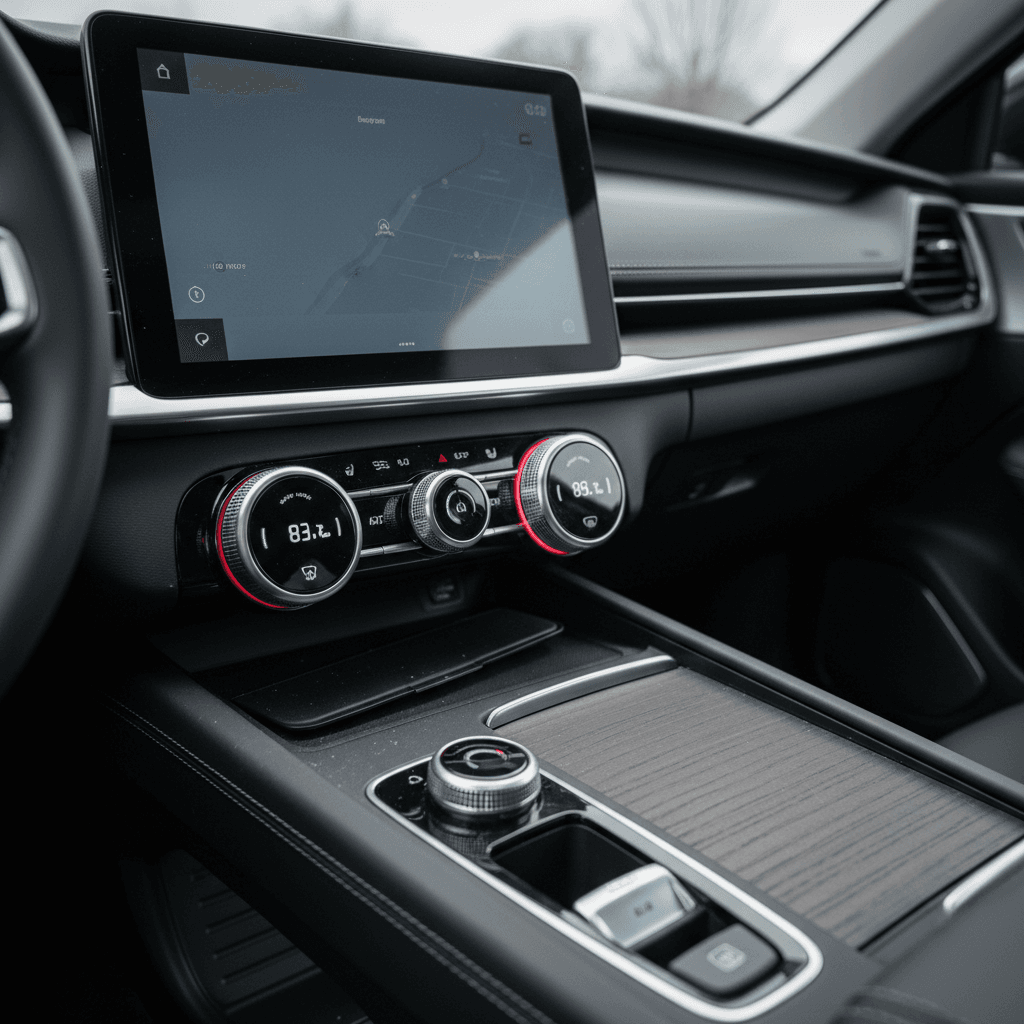
    Close-up of an EV center console with real knobs for climate and a volume dial below a moderate-sized touchscreen
    On a good EV interior, the touchscreen handles maps and apps while physical knobs and buttons control the things you reach for every drive.

    Pro move for remote shoppers

    If you’re buying online, ask the seller for close‑up photos, or a short video, of the climate panel, steering wheel, and center console. That tells you far more about everyday usability than a wide, glamor shot of the dash.

    Shopping used? How Recharged helps

    When you’re comparing used EVs, it’s easy to get wrapped up in battery size, range, and price and forget about how the interior actually works. But if you hate the way the car feels to use, you’ll never enjoy all that tech. This is where a curated marketplace like Recharged can smooth out the process.

    Why button lovers do well on Recharged

    It’s not just about range, usability matters too

    Verified battery health

    Every Recharged vehicle includes a Recharged Score Report with independently verified battery health. That lets you focus your in‑person time on the cabin and controls, not guessing whether the pack is tired.

    Buy from your couch, inspect like you’re there

    Detailed listings, high‑resolution photos, and EV‑specialist support mean you can shortlist cars that fit your ergonomic preferences, then ask specific questions about buttons vs touch before you commit.

    Fair pricing & flexible paths

    Recharged offers financing, trade‑in options, consignment, and nationwide delivery. You can focus on finding the EV with the right mix of physical controls and tech, while we make the numbers and logistics work.

    Ready to find your next EV?

    Browse Vehicles

    Leverage EV specialists

    If you care about physical controls, say so up front. A good EV specialist can steer you toward trims and years with more buttons, and away from the models that turned everything into glass.

    FAQ: Physical buttons in EVs

    Frequently asked questions about EVs with physical buttons

    Bottom line: Pick the EV that fits your hands, not just your range

    Electric cars don’t have to feel like smartphones on wheels. The best electric cars with physical buttons respect the fact that you’re driving first and swiping second, with big, clear controls for the things you use every day. As you shop, especially in the used market, pay as much attention to the knobs, switches, and stalks as you do to battery size and charging speed. An EV that fits your hands and your habits will be the one you actually love living with.

    If you’re ready to start comparing real cars instead of spec sheets, browse used EVs on Recharged, lean on the Recharged Score for battery confidence, and don’t be shy about asking for interior close‑ups. Your future self, cruising down the highway with one‑touch defrost and a trusty volume knob, will thank you.


    EVs on Recharged

    See all →
    2023 Ford Mustang Mach-E

    2023 Ford Mustang Mach-E

    GT•24K mi•257 mi range
    4.8/5Recharged Score
    $36,597
    2024 BMW iX

    2024 BMW iX

    xDrive50•41K mi•308 mi range
    4.8/5Recharged Score
    $45,997
    2025 Ford Mustang Mach-E

    2025 Ford Mustang Mach-E

    Premium•8K mi•300 mi range
    Pending Recharged Score
    $39,997

    Related Articles

    Is the BMW iX Worth Buying in 2026? Real-World Pros, Cons & Used Market Tips
    Reviews & Comparisons·10 min

    Is the BMW iX Worth Buying in 2026? Real-World Pros, Cons & Used Market Tips

    Wondering if the BMW iX is worth buying in 2026, new or used? Get real-world pros and cons, range & charging facts, depreciation, and buying tips for US shoppers.

    bmw-ixluxury-electric-suvused-ev-buying
    Chevy Blazer EV LT vs RS vs SS: Which Trim Should You Buy?
    Reviews & Comparisons·10 min

    Chevy Blazer EV LT vs RS vs SS: Which Trim Should You Buy?

    Compare Chevy Blazer EV LT vs RS vs SS. See performance, range, features, pricing, and which Blazer EV trim is best for your budget and driving style.

    chevy-blazer-evtrim-comparisonev-suv
    Polestar 2: How to Maximize Battery Life and Preserve Range
    Battery & Range·13 min

    Polestar 2: How to Maximize Battery Life and Preserve Range

    Learn how to maximize Polestar 2 battery life with charging habits, driving tips, software settings, and storage best practices to protect range and resale value.

    polestar-2battery-healthev-range