If you’re tired of juggling a cable every time you get in the car, a wireless charging pad for your car can make daily driving, and especially EV commuting, a lot smoother. The good news: 2025 brings faster Qi2 and MagSafe-compatible car chargers with better cooling and stronger magnets. The challenge is sorting through vent mounts, dash pads, and factory options to find what actually works in your vehicle.
Quick definition
Why wireless charging pads for cars matter in 2025
Why in-car wireless charging is becoming standard
If you rely on your phone for navigation, music, and hands-free calls, it’s not a luxury to keep it charged, it’s a necessity. A good in-car wireless charger keeps your phone visible, powered, and out of your hands so you can actually focus on driving. For EV drivers in particular, that also means reliable access to route planning apps, charging network apps, and your vehicle’s companion app.
EV owner tip
How a wireless charging pad for your car actually works
Most in-car wireless chargers use the same basic technology as the pad on your nightstand. Coils in the charger create an electromagnetic field that transfers power to coils in your phone. The current standard is Qi2, an evolution of the original Qi spec that adds a magnetic alignment system similar to Apple’s MagSafe, plus better power management and efficiency.
- Power source: The charger plugs into a 12V socket or USB-C port, then steps that power down to the correct voltage for wireless charging.
- Inductive coupling: Coils in the pad and in your phone line up; energy moves across the small air gap without physical metal-to-metal contact.
- Smart negotiation: The charger and phone agree on a safe power level (5W, 7.5W, 10W, 15W, and up), then ramp up or down based on temperature.
- Magnetic alignment (Qi2 / MagSafe): Magnets snap the phone into the right place so the coils overlap, which is critical in a moving car.
Don’t confuse phone charging with EV wireless charging
Types of in-car wireless chargers and mounts
Four common types of wireless charging pads for cars
Each style has pros and cons depending on your interior and driving style.
1. Vent-mounted wireless chargers
These clip to your HVAC vents and combine a phone mount with a wireless charging pad.
- Pros: Easy to install and remove, great line-of-sight for navigation, no adhesive.
- Cons: Can block airflow; may not fit circular or very thick vents.
2. Dash or windshield pads
Typically a suction cup or adhesive base with an integrated wireless pad.
- Pros: Works in more vehicles, keeps vents clear, lots of adjustment.
- Cons: Can leave marks on dash, may shake on rough roads if the arm is long.
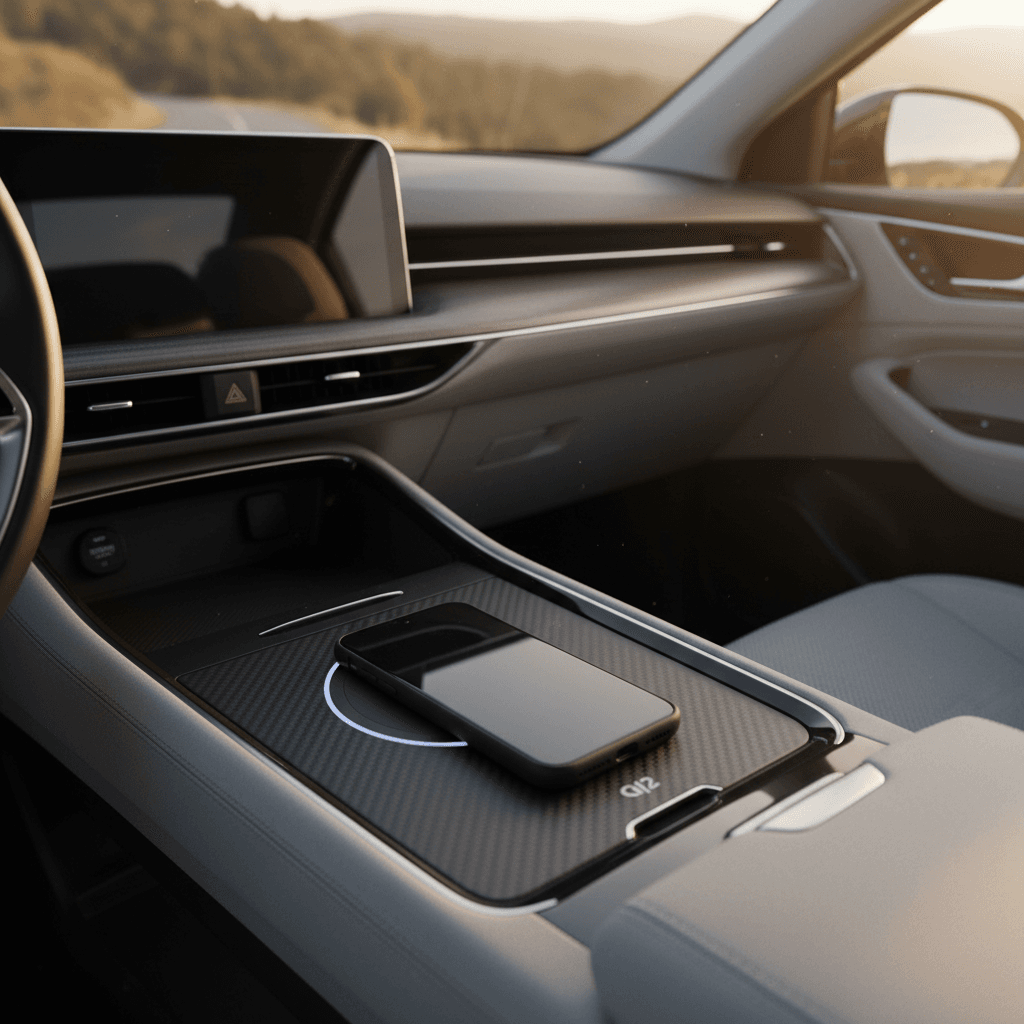
3. Factory-integrated pads
Many newer cars and EVs have a built-in rubber tray with wireless charging.
- Pros: Clean look, no extra wires, often tied to the car’s infotainment system.
- Cons: Fixed position, sometimes underpowered or prone to overheating.
4. Cup-holder and console mounts
Use a cup holder or cubby as a base for a wireless charging cradle.
- Pros: Good for vehicles with awkward dashes, easy to move between cars.
- Cons: Phone may sit low, requiring eyes off the road for quick glances.
Best all-around choice
Key features to look for in a wireless charging pad for car use
Once you know the mount style you prefer, focus on the details. Wireless charging looks simple from the outside, but small differences, like cooling, magnet strength, and cable quality, have a big impact on real-world performance.
Must-have features in a 2025 wireless car charger
Don’t just buy the cheapest pad, prioritize safety, speed, and stability.
Qi2 or MagSafe-compatible
Look for Qi2 certification or explicit MagSafe compatibility. That ensures magnetic alignment and up to 15W on many modern phones.
Active or smart cooling
Charging + navigation in a hot car can overheat your phone. Premium mounts from brands like Mous, ESR, JOWUA, and Mophie add fans or smart cooling to maintain speed.
Strong magnetic hold
A strong magnet array keeps your phone in place over bumps. Check that the charger is designed for MagSafe/Qi2 and, if you use a case, that the case is magnetic too.
Realistic power output
Many in-car pads advertise 15W but effectively deliver less due to heat or alignment issues. A reputable brand plus good cooling gets you closer to the advertised number.
Safety certifications
Look for overheat, overcurrent, and foreign-object protection. That’s especially important in an enclosed cabin in summer heat.
Mount and cable quality
A shaky arm or flimsy vent clip is more annoying than a slightly slower charger. A solid bracket and decent 20–30W USB-C adapter often matter more than specs on the box.
Watch your cases and accessories
Examples of strong wireless car charging setups
To make all of this concrete, here are a few types of setups that tend to work well in 2025. Exact models will change every year, but the patterns stay the same.
Representative wireless charging setups that work well
Use this as a pattern for what to buy, even if you pick different brands.
| Setup type | Mount style | Charging speed (target) | Best for | Notes |
|---|---|---|---|---|
| Qi2 vent mount with active cooling | Vent mount | Up to 15W | Daily commuters, EV drivers | Prioritize brands that mention cooling and strong magnetic force; great for hot climates. |
| MagSafe-compatible vent mount + quality USB-C adapter | Vent mount | 7.5–15W (phone-dependent) | iPhone users | Look for MagSafe language if you’re on iOS; pair with a 20–30W adapter for best results. |
| Factory wireless tray + short USB-C cable backup | Built-in tray | 5–10W typical | Newer EVs and premium ICE models | Use the factory pad for trickle charging, and a short cable as backup on road trips. |
| Cup-holder charger with flexible arm | Cup-holder | Up to 10–15W | Vehicles with limited dash space | Double-check that the arm is stiff enough to avoid wobble on rough roads. |
Always confirm compatibility with your specific phone, case, and vehicle vents before you purchase.
EV-specific nuance
Installation and safety tips for wireless car chargers
Safe installation checklist
1. Choose a mount that doesn’t block your view
Keep the phone below your direct line of sight and avoid blocking the windshield. Vent mounts are usually safe; big dash arms require more care.
2. Confirm vent compatibility
If you pick a vent mount, make sure it’s designed for vertical or horizontal slats. Many mounts don’t grip circular vents well.
3. Use a quality power adapter
Pair your pad with a reputable 20–30W USB-C adapter plugged into a 12V socket. Cheap adapters can overheat or fail to deliver enough power.
4. Manage cable routing
Route the cable so it doesn’t interfere with pedals, steering, or shifter movement. Simple adhesive clips can keep things tidy.
5. Test for interference with controls
Before you drive away, turn the wheel lock-to-lock and move the shifter through its positions to confirm nothing hits the mount or cable.
6. Don’t rely on charging alone in extreme heat
On very hot days, your phone may still throttle charging or pause altogether. Keep a wired backup cable in the glovebox for emergencies.
Heat is your main enemy
How wireless phone charging fits into EV ownership
Why EV drivers feel the difference
When you drive an EV, your phone becomes a second dashboard: it’s your route planner, charging network key, and often your digital key for the car itself. Losing battery mid-trip can mean losing access to charging locations, payment apps, or even the ability to unlock and start some vehicles.
Tidy cabin, focused driving
A clean, cable-free setup also fits the minimalist interiors you see in many modern EVs. A well-placed vent or dash charger keeps the phone secure while preserving that sleek look, especially if you’re driving a used EV you picked up through Recharged and want it to feel as modern as the latest models.
If you’re already thinking hard about DC fast-charging networks and home Level 2 charging, it’s worth spending a little time on your in-car phone setup too. A solid wireless charging pad for your car won’t change your EV’s range, but it will make every mile easier to manage.
Pair tech planning with vehicle shopping
Ready to find your next EV?
Browse VehiclesBuying checklist: choosing the right wireless charging pad for your car
Wireless car charger buying checklist
1. Confirm your phone’s charging standard
Check whether your phone supports MagSafe, Qi2, or only older Qi. That dictates how much you’ll benefit from newer chargers.
2. Decide on mount location
Vent, dash, windshield, cup holder, or factory tray, stand in the driver’s seat and imagine where the phone will live before you buy.
3. Check case compatibility
If you use a case, make sure it’s slim and magnetic (MagSafe or Qi2-ready). Avoid wallet cases or metal plates between phone and charger.
4. Look for cooling and certifications
Prioritize chargers that mention active cooling or thermal management and list safety certifications like Qi2 and standard electrical protections.
5. Match power adapter and cable
Plan to buy or reuse a solid 20–30W USB-C adapter and a short, high-quality cable. The best pad can underperform if the upstream power is weak.
6. Read real-world reviews
Before you click Buy, skim recent reviews that mention your specific phone model. Wireless performance can vary a lot between devices.
FAQ: wireless charging pads for cars
Frequently asked questions
Final thoughts: the right setup for your daily drive
A well-chosen wireless charging pad for your car doesn’t just add convenience, it supports safer, calmer driving by keeping your phone exactly where it should be: visible, stable, and charging quietly in the background. Focus on mount style, magnetic alignment, cooling, and a quality power adapter rather than chasing the highest wattage number on the box. And if you’re stepping into a used EV, whether you already own one or you’re browsing options on Recharged, treat your in-car phone setup as part of your overall charging plan. Get the basics right, and every commute, errand run, and road trip becomes just a bit easier.